💰Clinic Bill
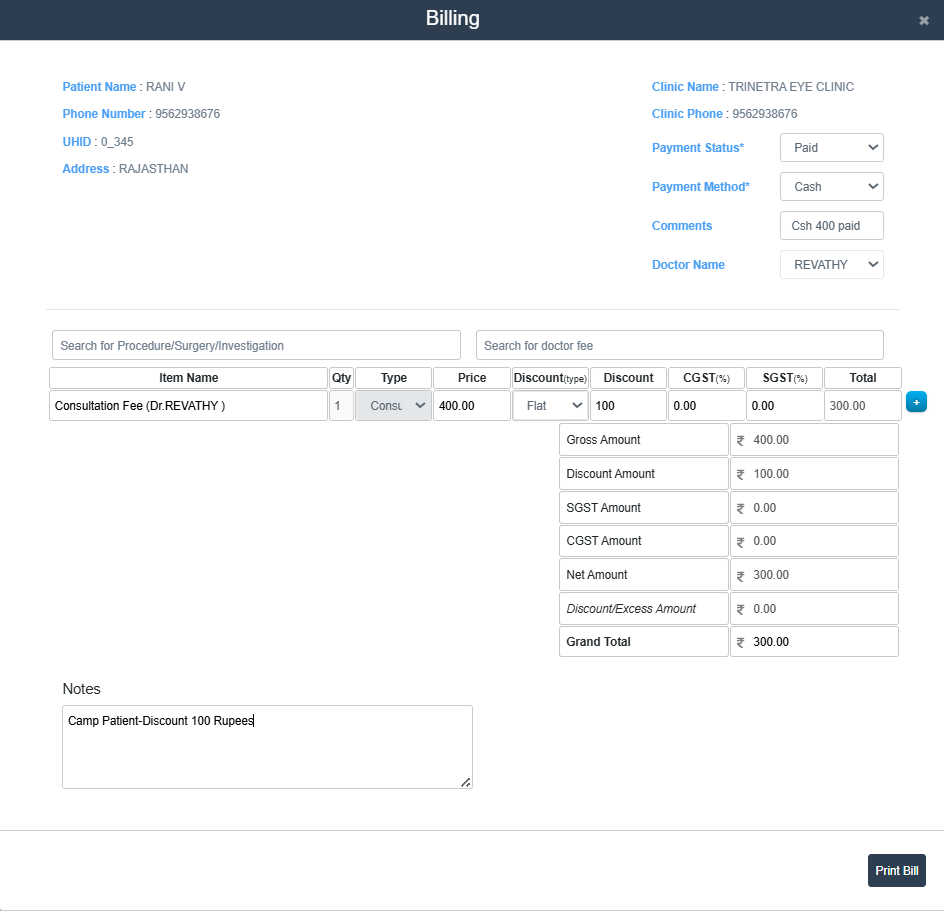
Billing/Invoice Screen (New Bill/Investigation Bill)
- This screen is used to generate and print bills for patients based on consultation, procedures, or investigations. It allows the user to apply discounts, calculate totals, and record payment details.
-
Patient and Clinic Information
- Patient Name: Displays the name of the patient.
- Phone Number: Shows the patient's mobile number.
- UHID: Unique hospital ID assigned to the patient.
- Address: Location details of the patient.
- Clinic Name: Name of the clinic generating the bill.
- Clinic Phone: Contact number of the clinic.
-
Payment Information
- Payment Status: Select whether the payment is marked as Paid/Not Paid/Free.
- Payment Method: Choose the mode of payment (Cash: Comments/ Card: Card No./ Online: UPI ID or Transaction No./ Free/ Split).
- Doctor Name: Select the consulting doctor from the dropdown.
-
Billing Details
- Search for and add procedures, investigations, or consultation fees.
- Quantity: Cannot be edited.
- Type: Select the type from drop-down list (Consultation/Consumables/Investigaion/Others/Procedures).
- Price: Enter the price for the service.
- Discount Type: Choose the discount type (Flat/%).
- Discount Amount: Enter the discount value.
- CGST/SGST: Enter CGST and SGST percentages if applicable
- Total: The total will be auto-calculated based on price, discount, and taxes.
-
Bill Summary Section
- Gross Amount: Original amount before any discount.
- Discount Amount: Total discount applied.
- SGST / CGST Amount: Tax values applied.
- Net Amount: Amount after applying discount and taxes.
- Discount/Excess Amount: Adjustments if any.
- Grand Total: Final amount to be paid by the patient.
-
Notes
- This section allows users to enter any custom notes for the bill.
-
Action Buttons
- ➕ Button at the right of the row to add New Items to the list.
- 🗑 Button at the left of the row to delete the corresponding entry.
- Print Bill: Click Print Bill Button at the bottom right of the screen to Generate the Bill.
tip
Generated Bills are listed in the Bill List (Clinic Bill List).